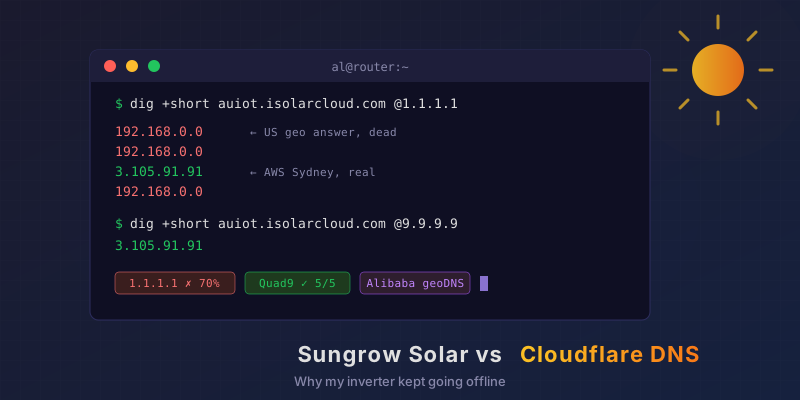
We had Sungrow solar and an EV charger put in, and the next morning the iSolarCloud app was already telling me the “network connection is abnormal”. I reckoned it’d be the WiFi. It was DNS. It’s always DNS. Specifically, Sungrow’s geo-routed DNS colliding with a Cloudflare privacy feature, and it took about 15 minutes to pin down.
The Setup
Installed the day before:
Inverter:       Sungrow SG15RT (15 kW, 3-phase) + WiNet-S2 WiFi dongle
Energy manager: Sungrow iHomeManager
EV charger:     Sungrow AC22E (22 kW, 3-phase)
Router:         OPNsense, Unbound resolver, DNS-over-TLS upstream
                → Cloudflare (1.1.1.1 / 1.0.0.1) + Quad9 (9.9.9.9)
All three Sungrow boxes live on my IoT VLAN. They can get out to the internet but can’t see anything else on the network. When the app started saying the connection was “abnormal” or “unavailable”, my money was on WiFi signal, the IoT firewall rules, or my DNS blocklists eating something they shouldn’t.
I worked through it with my AI agent, which ran the checks on the firewall over SSH and read the logs for me. The usual suspects fell over one by one.
Ruling Out the Usual Suspects
- WiFi: Ping to the dongle averaged 3.8 ms with about 1% loss.
- Firewall: Nothing from the inverter in the block log.
- DNS blocklists: The Sungrow hostnames came back
NOERROR, so nothing was blocked. - Cloud session: The dongle had an ESTABLISHED TCP session to
auiot.isolarcloud.com:16668(AWS Sydney).
So it was working fine right then. The DHCP log did have one odd entry: an unscheduled rejoin at 04:19, followed by a fresh DNS lookup for the cloud host. The reconnects needed a closer look.
The Weird Answer
A monitoring check I’d set up on the firewall couldn’t reliably connect to the Sungrow cloud host either. So we checked what DNS was handing out:
$ dig +short auiot.isolarcloud.com @<router>
192.168.0.0
That’s a private, unroutable address for what’s meant to be a cloud server. Five lookups against each upstream:
1.1.1.1:  4× 192.168.0.0   1× 3.105.91.91
1.0.0.1:  3× 192.168.0.0   2× 3.105.91.91
9.9.9.9:  5× 3.105.91.91
Quad9 got it right every time. Cloudflare got it wrong more often than not. Unbound spreads queries across both, so every time the inverter reconnected there was a decent chance it’d be handed a dead address. My IoT VLAN blocks private ranges anyway, though that address goes nowhere regardless. The inverter would sit offline until a later lookup came back right, and in the meantime the app said “network abnormal”.
Asking Sungrow’s DNS Directly
Cloudflare doesn’t make records up, so the next step was to go straight to Sungrow’s authoritative nameservers, which are on Alibaba Cloud DNS (vip3.alidns.com). Asked with no location hint, they returned the correct CNAME to the AWS load balancer.
Alibaba DNS supports geo-routing, so we tried posing as clients in different countries using EDNS Client Subnet:
$ dig +short +ednsopt=8:00011800<subnet> auiot.isolarcloud.com @vip3.alidns.com

AU  1.120.0.0/24   → au-prod-iotloadbanlancernew-….elb.ap-southeast-2.amazonaws.com.
DE  85.214.0.0/24  → au-prod-iotloadbanlancernew-….elb.ap-southeast-2.amazonaws.com.
SG  8.128.0.0/24   → au-prod-iotloadbanlancernew-….elb.ap-southeast-2.amazonaws.com.
CN  114.114.114.0  → au-prod-iotloadbanlancernew-….elb.ap-southeast-2.amazonaws.com.
JP  126.0.0.0/24   → au-prod-iotloadbanlancernew-….elb.ap-southeast-2.amazonaws.com.
US  8.8.8.0/24     → 192.168.0.0
US  104.16.0.0/24  → 192.168.0.0
US clients get 192.168.0.0, and every other region I tried gets the real server. My guess is Sungrow is deliberately blackholing US traffic to the Australian region, though I can’t confirm that from the outside.
Where Cloudflare Comes In
Cloudflare’s 1.1.1.1 doesn’t send EDNS Client Subnet. That’s a deliberate privacy choice, so your location never reaches the authoritative server. Alibaba’s DNS has to work out where you are from the IP of Cloudflare’s resolver instead, and a lot of Cloudflare’s address space is registered in the US.
My queries were being answered at Cloudflare’s Sydney site (id.server came back syd08), and Sungrow’s DNS still often decided I was American and served the blackhole. Different cache nodes at the same site were holding different answers, which is why the results bounced around:
$ dig auiot.isolarcloud.com @1.1.1.1 +noall +answer
auiot.isolarcloud.com.  570  IN  CNAME  au-prod-iotloadbanlancernew-….amazonaws.com.
…amazonaws.com.          30  IN  A      3.105.91.91

$ dig auiot.isolarcloud.com @1.1.1.1 +noall +answer
auiot.isolarcloud.com.  574  IN  A      192.168.0.0
Both sides are doing what they meant to do. Sungrow geo-blocks on purpose and Cloudflare keeps your location private on purpose. Put the two together and Aussie customers on 1.1.1.1 cop the US treatment.
The EV charger’s cloud domain (iot.ienergycharge.com, also on Alibaba DNS) has a milder version of the same thing. US-looking resolvers get pointed at a Hong Kong server instead of the Australian one, and Cloudflare handed out the Hong Kong address about 40% of the time.
The Fix
I added per-domain DNS-over-TLS forwarding in Unbound so the Sungrow domains go to Quad9 only. Everything else still goes out the same way it always did.
In OPNsense it’s under Services → Unbound DNS → DNS over TLS:
| Domain | Server | Port | Verify CN |
|---|---|---|---|
isolarcloud.com | 9.9.9.9 | 853 | dns.quad9.net |
isolarcloud.com | 149.112.112.112 | 853 | dns.quad9.net |
ienergycharge.com | 9.9.9.9 | 853 | dns.quad9.net |
ienergycharge.com | 149.112.112.112 | 853 | dns.quad9.net |
Apply, then flush the bad answers out of the cache:
unbound-control -c /var/unbound/unbound.conf flush_zone isolarcloud.com
unbound-control -c /var/unbound/unbound.conf flush_zone ienergycharge.com
After that, 10 out of 10 cache-flushed lookups through the router came back with the right AWS Sydney address for both domains.
If you’re running plain Unbound, the equivalent is a forward-zone for each domain with forward-tls-upstream: yes and Quad9’s @853#dns.quad9.net addresses.
Keeping an Eye On It
There’s now a small script on the firewall that runs every minute and writes one CSV line:
ts,wifi_loss_pct,wifi_rtt_ms,cloud_sessions,wan_loss_pct,cloud_tcp_ok,dns_answer
2026-11-18T09:14:34+1100,0.0,7.487,1,0.0,1,3.105.91.91
Next time the app has a whinge, I can look up that minute and see what failed: WiFi, the dongle’s cloud session, my internet connection, or DNS. If 192.168.0.0 turns up in the last column, the problem’s back.
The DNS side is fixed. It’s too early to say the app errors are gone for good, so I’ll update this once I’ve got a few days of data.
If You’ve Got Sungrow Gear
Have a scroll through the iSolarCloud reviews and you’ll find people complaining about “network abnormal” and devices dropping offline all the time. I can’t say they’ve all got the same problem as me, but I doubt I’m the only one.
If you’re in Australia with Sungrow gear and Cloudflare DNS anywhere in the chain (your router, the dongle itself, or an ISP that forwards to it), you could be getting intermittent “network abnormal” errors that have nothing to do with your WiFi. It’s a 10-second check:
for i in 1 2 3 4 5; do dig +short auiot.isolarcloud.com @1.1.1.1 | tail -1; done
If 192.168.0.0 shows up, point the Sungrow domains at a resolver that places you in Australia properly (Quad9 and Google both did in my testing), or change your upstreams altogether.
An installer would’ve blamed my WiFi and Sungrow support would’ve blamed my ISP. What found it was checking each layer in turn, right down to querying Sungrow’s nameservers with fake client subnets. Having my AI agent run the checks and read the logs turned that into a 15-minute job instead of a weekend.
As the old sysadmin haiku goes:
It’s not DNS
There’s no way it’s DNS
It was DNS