Debian 13 is out and I did what any sensible person does: installed it on a spare machine, then immediately tried to make it do something it doesn’t want to do.
Here’s the problem in two lines. Debian 13 ships Python 3.13 and NVIDIA driver 550, which tops out at CUDA 12.4. ComfyUI wants PyTorch 2.9+, compiled against CUDA 12.8, which wants driver 570+. That’s a gap. And on Debian, the official NVIDIA CUDA repo doesn’t support 13 yet anyway. You could hunt down a third-party driver package. You could also jam a fork into a toaster. Both will end badly.
I wrote this because I couldn’t find a single source of truth for the whole thing. It’s pieced together from NVIDIA’s forward-compatibility docs (which aren’t exactly on the front page), Debian 13 release notes, and a couple of hours of trial and error. If you’ve found a better way, genuinely, send it to me.
I’m running an RTX 3060 with 8GB of VRAM. Nothing exotic. The machine sits in a corner and doesn’t complain much. I’d like to keep it that way.
The approach
CUDA has a thing called forward compatibility. A PyTorch build compiled against CUDA 12.8 will run on a system with CUDA 12.4, as long as the driver supports 12.4, which it does, because driver 550 is a CUDA 12.x driver. This isn’t a hack. NVIDIA document it. They just don’t make a song and dance about it because it undercuts their “please install our repo” sales pitch.
So the plan: stick to Debian’s own non-free packages, use Python 3.12 instead of 3.13 (fewer missing wheels, less swearing), install PyTorch 2.5.1 as a stepping stone, then let ComfyUI’s requirements.txt pull in the newer build. It’ll land on PyTorch 2.9.1+cu128 and shrug because the driver’s close enough.
Steps
1. Install UV
UV is what pip should have been. Rust, fast, doesn’t spend 90 seconds resolving dependencies only to bail on a conflict.
curl -LsSf https://astral.sh/uv/install.sh | sh
source $HOME/.local/bin/env
export PATH="$HOME/.local/bin:$PATH"
2. Install Python 3.12
UV manages Python versions without touching your system install. Debian 13’s 3.13 stays where it is, doing whatever it does. We bring in 3.12 alongside.
uv python install 3.12
python3.12 --version
3. Create the venv
Nuke any old .venv first. Stale environments cause problems you’ll chase for an hour before realising you’re an idiot. Then let UV build a fresh one.
cd ~/Source/ComfyUI
rm -rf .venv
uv venv --python 3.12 .venv --prompt "Comfy UI"
source .venv/bin/activate
python -m ensurepip --upgrade
UV’s venvs are minimal. No pip by default. The ensurepip line bootstraps it. Use pip3 or python -m pip from here on; pip alone won’t resolve.
4. Install PyTorch 2.5.1
This is the anchor. 2.5.1+cu124 matches your driver’s CUDA 12.4 capability. It’ll be replaced in the next step, but installing it first means the dependency resolver has a known-good starting point.
pip3 install --upgrade pip
pip3 install torch==2.5.1+cu124 torchaudio==2.5.1 \
    --extra-index-url https://download.pytorch.org/whl/cu124
Verify:
import torch
print(torch.__version__)     # 2.5.1+cu124
print(torch.version.cuda)    # 12.4
5. Install ComfyUI dependencies
pip3 install -r requirements.txt
This pulls in about 50 packages and upgrades PyTorch to 2.9.1+cu128 in the process. Forward compatibility makes that fine. If you’re the type who needs to understand why before trusting it, NVIDIA’s docs are here: https://docs.nvidia.com/deploy/cuda-compatibility/#forward-compatibility
6. Fix the CUDA init problem
If you skip this, ComfyUI will greet you with CUDA unknown error and you’ll spend twenty minutes reinstalling things that weren’t broken. Don’t.
sudo systemctl enable nvidia-persistenced
sudo systemctl start nvidia-persistenced
sudo reboot
On Linux the NVIDIA kernel module unloads when nothing’s using it. nvidia-persistenced pins it open. You must reboot. The module doesn’t reload until the next boot cycle.
7. Launch
cd ~/Source/ComfyUI
source .venv/bin/activate
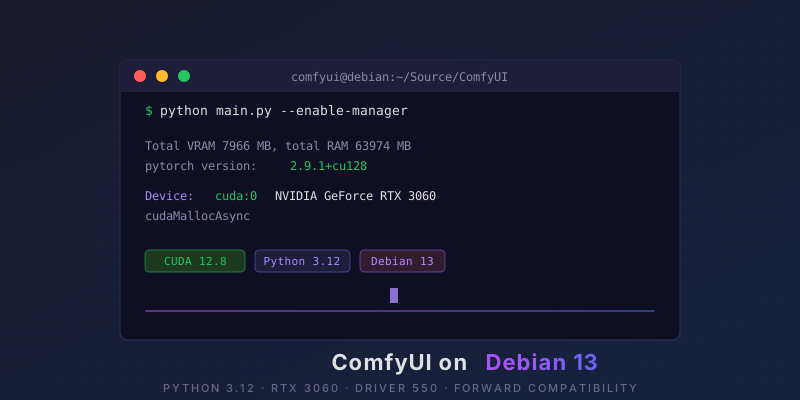
python main.py --enable-manager
If it worked:
Total VRAM 7966 MB, total RAM 63974 MB
pytorch version: 2.9.1+cu128
Device: cuda:0 NVIDIA GeForce RTX 3060 : cudaMallocAsync
ComfyUI is at http://127.0.0.1:8188. Close the browser tab you had open on port 7860 from last time. That was Automatic1111. Different thing. We’ve moved on.
Troubleshooting
| Problem | Fix |
|---|---|
pip: command not found | Use pip3 or python -m pip |
| PyTorch 2.9 install fails | Install 2.5.1 first, then let requirements.txt upgrade |
torch.cuda.is_available() is False | Enable nvidia-persistenced and reboot |
CUDA unknown error | Same. Persistenced, then reboot. |
| Port 8188 in use | --port 8080 |
Should you do this?
If you run Debian and want to keep it that way. No third-party driver repos, no PPAs, no “just switch to Arch”. Then yes. The whole thing works inside Debian’s own package boundaries. Driver 550 from non-free, Python 3.12 via UV, everything else in a venv. Your system stays update-safe and you get ComfyUI at full speed on an RTX 3060.
If you’ve got a newer card or you’re on a distro that ships driver 570+, you don’t need any of this. Just install PyTorch and go. But if you’re sitting on Debian 13 looking at a version gap with that particular “oh for god’s sake” feeling, this is your path through.
June 2026 · Debian 13 · ComfyUI · RTX 3060 · Driver 550.163.01